GTA 6 PS5 guide · Facts checked November 24, 2026
GTA 6 PS5 Remote Play: play GTA 6 on your phone
Yes, you can play GTA 6 on your phone with PS5 Remote Play. PlayStation's GTA VI listing says Remote Play is supported: the game keeps running on your PS5, and the free PS Remote Play app streams it to your iPhone, iPad or Android phone. There is no GTA 6 mobile version, so this is the official way to play it away from the TV. Here is what you need, how to set it up, and what to expect.
- Remote Play
- YesSupported, per PlayStation
- App
- FreePS Remote Play
- Internet
- 5MbpsMinimum · 15 recommended
- Phone
- iOS 14Or Android 9 and later
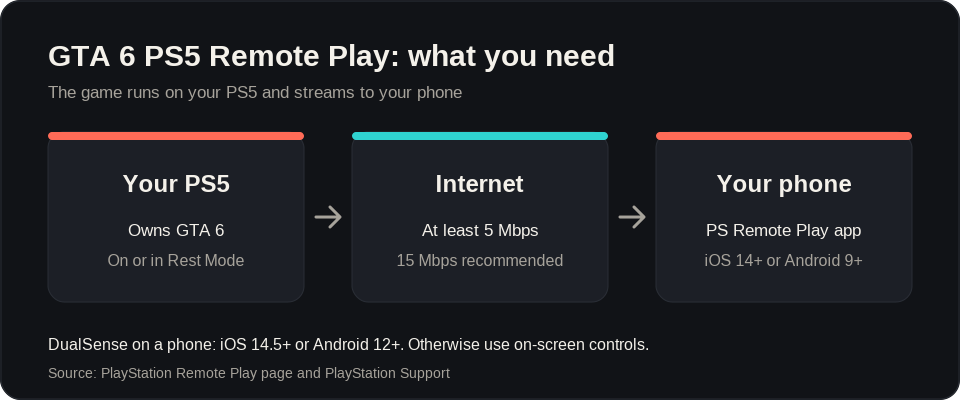
What you need for GTA 6 PS5 Remote Play
From PlayStation's Remote Play page. You need your own PS5 with GTA 6 on it; the app does not run the game by itself.
| You need | Minimum | Recommended or note |
|---|---|---|
| Console | PS5, PS5 Digital Edition or PS5 Pro with GTA 6 | Powered on or in Rest Mode |
| Internet | 5 Mbps | 15 Mbps or more, on Wi-Fi or mobile data |
| iPhone or iPad | iOS 14 (on-screen controls) | iOS 14.5 or later to use a DualSense |
| Android phone or tablet | Android 9 (on-screen controls) | Android 12 or later to use a DualSense |
| PC or Mac | PS Remote Play app | Also supported; see PlayStation's page for versions |
| Account | Your PlayStation account | The same one you use on the PS5 |
Short version: a recent phone, a DualSense if you have one, and a connection of 15 Mbps or better at both ends gives you the best GTA 6 stream.
How to set up GTA 6 Remote Play on PS5 and your phone
Steps 1 and 2 are on the PS5 and you only do them once. The menu paths come from PlayStation Support.
- Turn on Remote Play on the PS5
From the home screen, go to Settings > System > Remote Play and turn on Enable Remote Play. You can set this for each user.
- Let the PS5 wake from Rest Mode
Go to Settings > System > Power Saving > Features Available in Rest Mode and turn on Stay Connected to the Internet and Enable Turning on PS5 from Network. Now you can start a session while the PS5 is resting.
- Install the app and sign in
Get the free PS Remote Play app from the App Store or Google Play, open it and sign in with the same account you use on the PS5.
- Connect a controller, or use touch
Pair a DualSense with your phone over Bluetooth (iOS 14.5 or Android 12 and later). Without one, the app shows on-screen controls.
- Start Remote Play and launch GTA 6
In the app, choose PS5. Your console's home screen appears on the phone; start GTA 6 from there as usual.
Using mobile data? In the app, tap Settings at the upper right and choose Mobile Data > Use Mobile Data. It counts against your data allowance.
Is there a GTA 6 mobile version?
No. GTA 6 is not available as an iPhone or Android app. A "GTA 6 APK" or download link is not from Rockstar, so do not install one. Streaming from your own PS5 with Remote Play is the official way to play GTA 6 on a phone, and you need to own the game on PS5 to do it.
What GTA 6 Remote Play is like
The game runs on your PS5 exactly as it does on the TV, at the same 30 fps; see GTA 6 PS5 vs PS5 Pro for how each console handles it. What changes is the picture you get: Remote Play sends a video stream over the internet, so how good it looks depends on your connection.
- Use Wi-Fi at home. PlayStation recommends at least 15 Mbps; a weak connection at either end, the PS5's or the phone's, shows up as blur and stutter.
- Use a controller. GTA 6 asks for a lot of driving and aiming at once, and a DualSense, including the GTA 6 PS5 controller, is far easier than touch controls.
- Nothing to install on the phone besides the app. The 212 GB game stays on the PS5.
Can you play GTA 6 on PlayStation Portal?
Yes, because PlayStation Portal is a Remote Play device. It does not run games by itself: it needs your PS5, on or in Rest Mode and connected to the internet. GTA 6 then streams from your PS5 the same way it does to a phone, with the DualSense-style controls built in.
GTA 6 Remote Play not connecting?
- Check the Rest Mode settings in step 2. Without them, the app cannot wake a resting PS5.
- Pair manually. Put the phone and the PS5 on the same network, go to Settings > System > Remote Play on the PS5, select Pair Device, and enter the number shown into the app.
- Update everything. Install the latest PS5 system software and the latest version of the app.
- Crashing, not disconnecting? If GTA 6 itself stops with error CE-108255-1, that is the game, not Remote Play. See our GTA 6 PS5 crash fix.
GTA 6 PS5 Remote Play FAQ
Can I play GTA 6 on my phone?
Yes, by streaming it from your own PS5 with the free PS Remote Play app. There is no GTA 6 app for iPhone or Android.
Does GTA 6 support PS5 Remote Play?
Yes. PlayStation's GTA VI listing says Remote Play is supported.
Is PS Remote Play free?
Yes. The PS Remote Play app is free on iPhone, iPad, Android, PC and Mac. You still need a PS5 that owns GTA 6.
Can I use Remote Play with mobile data?
Yes. Turn on Use Mobile Data in the app's settings. PlayStation asks for at least 5 Mbps and recommends 15 Mbps, and streaming uses your data allowance.
Can I play GTA 6 on PlayStation Portal?
Yes. The Portal streams games from your PS5 with Remote Play, so it plays GTA 6 when your PS5 is on or in Rest Mode.
What do I need on my phone for GTA 6 Remote Play?
iOS 14 or Android 9 and later for touch controls. To use a DualSense, you need iOS 14.5 or Android 12 and later.
Sources
Checked on November 24, 2026. Requirements and menu paths are PlayStation's own; check them again after system updates.
Playing GTA 6 on your phone?
Tell other players which phone and connection you use for GTA 6 Remote Play and how well it runs. Plain text only; links are not accepted.