GTA 6 PS5 guide · Facts checked November 24, 2026
GTA 6 PS5 SSD guide: which M.2 drive to add for 212 GB
Shopping for a GTA 6 PS5 SSD? You only need one if you cannot clear 212 GB. GTA 6 needs at least 212 GB of free space and runs only from the PS5's built-in SSD or a compatible M.2 SSD in the expansion slot, not from a USB drive. If you are short, PlayStation's rule is simple: a PCIe Gen4 M.2 NVMe SSD with a heatsink, ideally rated at 5,500 MB/s or faster. Below: whether your PS5 needs one, the official requirements, what size to buy, five drives that fit and how to move GTA 6 onto one.
- Free space needed
- 212GBGTA 6 minimum, per PlayStation
- Read speed
- 5,500MB/sRecommended minimum for an M.2 SSD
- Interface
- Gen4PCIe Gen4 x4 M.2 NVMe, heatsink required
- Largest drive
- 8TBSupported sizes: 250 GB to 8 TB
Do you need an SSD for GTA 6 on PS5?
Probably not. Check first under Settings > Storage > Console Storage. If you can free more than 212 GB, plus a little room for patches, you do not need to buy anything: PlayStation asks for at least 212 GB, and GTA 6 fits on every PS5 model when the console is empty.
| Console storage | Usable space | Left after GTA 6 |
|---|---|---|
| PS5 with an 825 GB SSD | 667 GB | About 455 GB |
| PS5 with a 1 TB SSD | 848 GB | About 636 GB |
| PS5 Pro, 2 TB | About 1.89 TB (TechRadar) | About 1.68 TB |
The squeeze comes from everything else you keep installed. A few other big games can fill an 825 GB console, so an M.2 SSD is for players who want GTA 6 and the rest of their library installed at the same time. If you mostly play GTA 6 for now, the free fix is to delete games you have finished: you can download them again later, and saved data stays on the console unless you delete it as well. The 212 GB figure and the usable space on each console are explained in how big GTA 6 is on PS5.
Can you play GTA 6 from a USB external hard drive?
No. PlayStation says PS5 games cannot be played directly from USB extended storage, so GTA 6 has to sit on the console's built-in SSD or on an M.2 SSD in the expansion slot to start. A cheap external hard drive does not fix the GTA 6 space problem on its own.
It still helps in one way. A USB drive can hold PS5 games you are not playing: move them there to free internal space for GTA 6, then copy them back when you want to play them, instead of downloading them again. PS4 games can be played straight from USB extended storage. PlayStation's requirements for the drive are SuperSpeed USB 5 Gbps or faster and 250 GB to 8 TB.
So the choice is simple. Want GTA 6 and several other PS5 games ready to play at once? Buy an M.2 SSD. Happy to swap games in and out? A USB drive is the cheaper parking spot.
PS5 SSD requirements for GTA 6
These are PlayStation’s official M.2 SSD requirements, checked on November 24, 2026. They cover every PS5 with an expansion slot, including the PS5 Pro (the CFI-7000 models on PlayStation's page). Update the console's system software before you install a drive.
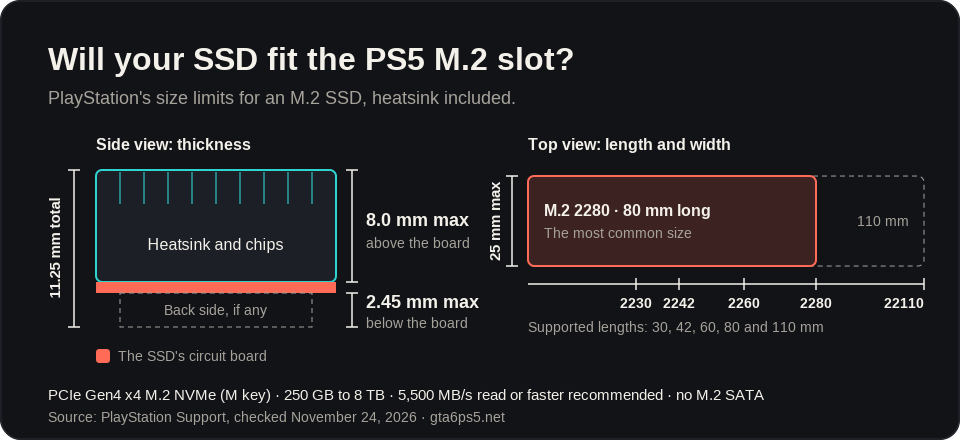
| Requirement | What PlayStation asks for |
|---|---|
| Interface | PCIe Gen4 x4 M.2 NVMe SSD (M key, Socket 3). M.2 SATA drives are not supported. |
| Capacity | 250 GB to 8 TB |
| Read speed | 5,500 MB/s sequential read or faster recommended |
| Form factor | M.2 2230, 2242, 2260, 2280 or 22110 |
| Size with heatsink | Up to 25 mm wide and 11.25 mm thick: up to 8.0 mm above the board and 2.45 mm below it |
| Cooling | Required: a heatsink or heat transfer sheet. Single-sided and double-sided drives both work. |
The easiest way to meet the cooling rule is a drive with a heatsink already fitted, which is why every pick below has one. Sony also says two things worth knowing before you buy: it cannot guarantee that every drive meeting these specs will work, and a game may not run exactly as it does from the internal SSD even when the M.2 drive is faster than 5,500 MB/s. If GTA 6 misbehaves after you move it, PlayStation's advice is to move the game back to the console's internal storage.
What size SSD do you need for GTA 6?
GTA 6 alone takes at least 212 GB, and every patch adds a little more. Choose the size by how many other big games you want installed next to it:
- 1 TB: room for GTA 6 plus a few other large games. The cheapest upgrade that is clearly worth fitting.
- 2 TB: the sensible pick if you keep a big library installed. It adds more space than an 825 GB or 1 TB console has built in.
- 4 TB or 8 TB: only if you never want to delete anything. The PS5 supports drives up to 8 TB.
Expect to pay more than you would have a year ago. TechRadar reported in January 2026 that the 2 TB Samsung 990 PRO with Heatsink had gone from about $170 in November 2025 to $319.99 on Amazon, as memory makers moved production toward AI data centers. TrendForce expected NAND flash contract prices to rise again in the fourth quarter of 2026, though more slowly. So compare price per terabyte rather than grabbing the cheapest listing, and check that the exact model you pick includes the heatsink.
Best SSDs for GTA 6 on PS5
Every drive here meets PlayStation's requirements above, has a heatsink fitted at the factory and is rated well past 5,500 MB/s. Speeds are the makers' own figures. We have not listed prices because they change daily; follow the links to check today's price.
| Drive | Best for | Sizes | Read speed, up to |
|---|---|---|---|
| SanDisk Optimus GX PRO 850P for PS5 | An officially licensed drive | 1, 2, 4, 8 TB | 7,300 MB/s (1 to 4 TB) |
| Samsung 990 PRO with Heatsink | Top speed from a big brand | 1, 2, 4 TB | 7,450 MB/s |
| Seagate FireCuda 530R with Heatsink | The same speed in every size | 1, 2, 4 TB | 7,400 MB/s |
| Corsair MP600 PRO LPX | The widest choice of sizes | 500 GB to 8 TB | 7,100 MB/s |
| Lexar NM790 with Heatsink | A lower-cost option | 1, 2, 4 TB | 7,400 MB/s |
SanDisk Optimus GX PRO 850P for PS5
This is the drive many people still know as the WD_BLACK SN850P: SanDisk renamed its WD_BLACK line to Optimus in 2026. It is officially licensed for the PS5 and PS5 Pro, ships with a heatsink designed for them, and PlayStation Direct sells it. Some sizes showed as unavailable or low on stock there on November 24, 2026, and stores may still list it under the old WD_BLACK name. PlayStation Direct listing
Samsung 990 PRO with Heatsink
The fastest drive on this list on paper, and Samsung lists the PlayStation 5 as a supported use. Make sure the listing says with Heatsink (model numbers ending in CW): the plain 990 PRO has no heatsink and would need one fitted. Samsung product page
Seagate FireCuda 530R with Heatsink
Seagate rates it at 7,400 MB/s in every size and lists it as PS5 compatible. Its factory heatsink measures 24.22 mm wide and 11.10 mm tall, just inside PlayStation's limits. A version without the heatsink also exists, so pick the heatsink model. Seagate product page
Corsair MP600 PRO LPX
It comes with a low-profile aluminum heatsink and is the only pick that goes from 500 GB all the way to 8 TB, in black or white. Corsair says it exceeds the PS5 and PS5 Pro M.2 requirements. The 8 TB model showed out of stock on Corsair's store on November 24, 2026. Corsair product page
Lexar NM790 with Heatsink
Lexar sells this version with an integrated heatsink and lists it as compatible with PS5 consoles, so there is nothing extra to buy. It launched in November 2023 at $149.99 for 2 TB, though SSD prices have climbed a long way since. The regular NM790 has no heatsink, so check the name before you order. Lexar product page
Drives that are getting hard to find
Seagate's officially licensed Game Drive PS5 NVMe SSD came in 1 TB and 2 TB, but Seagate's US store listed it as no longer in stock on November 24, 2026. Crucial T500 heatsink models still turn up as well, but Micron has left the Crucial consumer business, so stock is running out (Micron says warranties are still honored). Either is fine if you find one at a good price.
How to install an SSD in your PS5 and move GTA 6
Fitting an SSD needs one tool and no technical skill. The cover comes off differently on the original PS5 (CFI-1000 models) and on the PS5 Slim and PS5 Pro (CFI-2000 and CFI-7000 models), so keep PlayStation’s step-by-step guide open for your model.
- Update the PS5 first. Settings > System > System Software > System Software Update and Settings.
- Get ready. You need a #1 Phillips screwdriver, a table in a well-lit room and, if you like, a small flashlight. Turn the PS5 off completely, unplug it, and touch a grounded metal object to discharge static.
- Open the expansion slot. Remove the cover and the slot cover as shown for your model. Do not turn the console on while the cover is off.
- Fit the SSD. Slide it into the slot, secure it with the screw, then put the slot cover and console cover back.
- Format it. Turn the PS5 on and follow the prompt to format the drive. Formatting erases anything already on it, and you must not switch off the console while it runs.
- Move GTA 6 to the SSD. In your Game Library, highlight GTA 6, press Options and choose Move Games and Apps. To send new downloads straight to the SSD, set Settings > Storage > Installation Location.
You can check free space on the new drive under Settings > Storage > M.2 SSD Storage. If GTA 6 starts crashing after the move, move it back to internal storage first, then work through our GTA 6 PS5 crash fix for error CE-108255-1. Still deciding which console to buy? Storage is one of the differences covered in GTA 6 PS5 vs PS5 Pro and in our GTA 6 PS5 bundle guide.
GTA 6 PS5 SSD FAQ
Does GTA 6 need an SSD on PS5?
It has to be installed on SSD storage, which every PS5 already has built in. You only need to buy an extra M.2 SSD if you cannot free the 212 GB that GTA 6 asks for.
Will the PS5 have enough storage for GTA 6?
Yes. An empty PS5 with an 825 GB SSD has 667 GB usable, so about 455 GB is left after GTA 6. The catch is the other games you keep installed.
Can you play GTA 6 from an external hard drive?
No. PS5 games cannot run from USB extended storage. A USB drive can only store GTA 6 or other PS5 games until you copy them back to the console or an M.2 SSD.
What size SSD should I get for GTA 6?
1 TB covers GTA 6 plus a few other large games. Get 2 TB if you keep a big library installed. The PS5 supports drives up to 8 TB.
Do I need a heatsink on a PS5 SSD?
Yes. PlayStation requires a heatsink or heat transfer sheet on any M.2 SSD in the PS5. Buying a drive with one already fitted is the easiest way to get it right.
Does the PS5 Pro need an SSD for GTA 6?
Usually not. It has a 2 TB SSD with about 1.89 TB usable, according to TechRadar, so GTA 6 fits with plenty to spare. It also has an M.2 expansion slot if you fill it.
Can I move GTA 6 to the M.2 SSD after installing it?
Yes. Highlight GTA 6 in your Game Library, press Options and choose Move Games and Apps. You do not have to download it again.
Does GTA 6 run worse from an M.2 SSD?
PlayStation says a game may not perform exactly as it does from the internal SSD, even on a drive faster than 5,500 MB/s. If GTA 6 has problems from the M.2 SSD, move it back to internal storage.
Sources
Checked on November 24, 2026. Drive details come from each maker's product page or datasheet. We do not earn a commission from any store linked on this page.
- PlayStation Support: How to add an M.2 SSD to a PS5 console (requirements and steps)
- PlayStation Support: USB extended storage on PS5
- PlayStation: Grand Theft Auto VI game page (212 GB free space)
- PlayStation: PS5 Pro (2 TB SSD)
- TechRadar: PS5 Pro review (1.89 TB usable)
- TechRadar: PS5 SSD prices rocket as the RAM shortage spreads (January 2026)
- TrendForce: 4Q26 NAND flash price forecast (September 30, 2026)
- PlayStation Direct: SanDisk Optimus GX PRO 850P NVMe SSD for PS5 consoles
- Samsung: 990 PRO with Heatsink
- Seagate: FireCuda 530R SSD with Heatsink
- Corsair: MP600 PRO LPX (PS5 compatible)
- Lexar: NM790 with Heatsink
- Lexar: NM790 with Heatsink launch announcement (November 2023)
- Seagate: Game Drive PS5 NVMe SSD
- Micron: exit from the Crucial consumer business
Which SSD did you put in your PS5?
Tell other players which drive and size you installed, which PS5 you have and how GTA 6 runs from it. Plain text only; links are not accepted.